Video course for UK sole traders
The next Making Tax Digital start date is 6 April 2027. Get set up first.
If you took in over £30,000 before expenses in 2025 to 2026, from self-employment and any property, you'll need digital records and an update to HMRC every three months. This course gets you there one short video at a time, on your own figures.
Or watch a free six-minute lesson first
24 short videos, plus the workbook and templates to keep. Rules checked on GOV.UK.
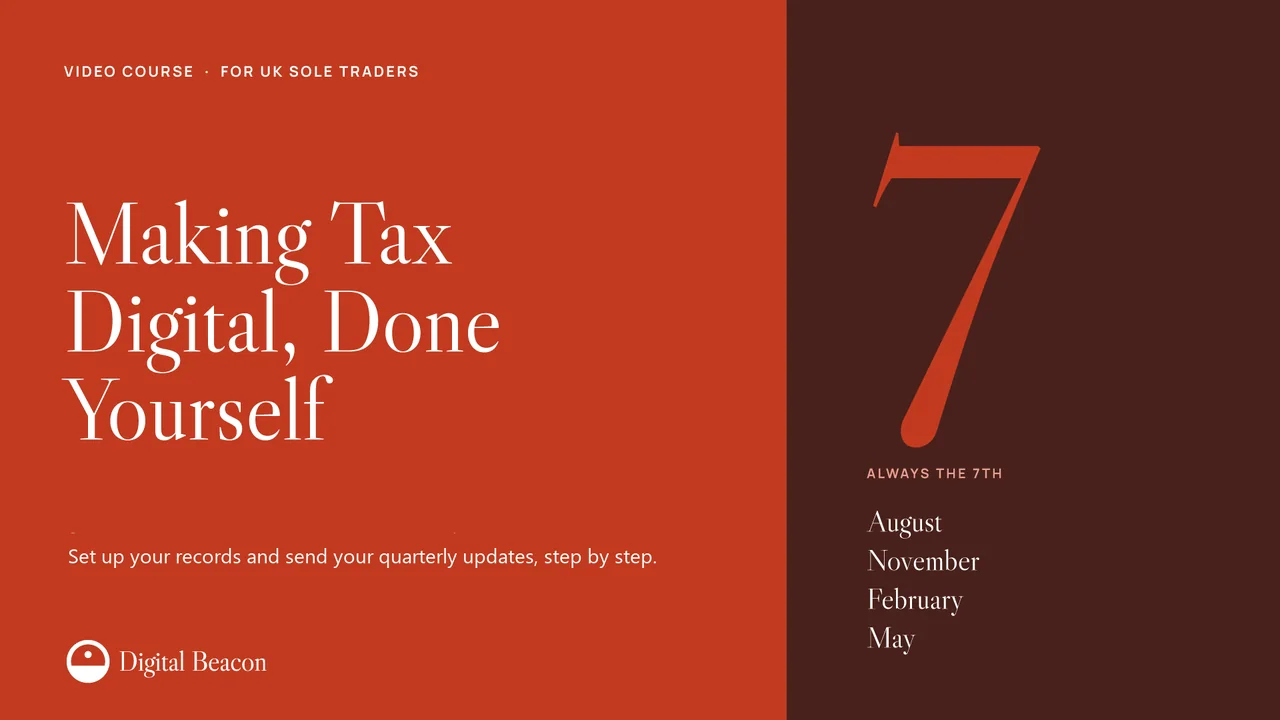
Your new tax year
Always the seventh.
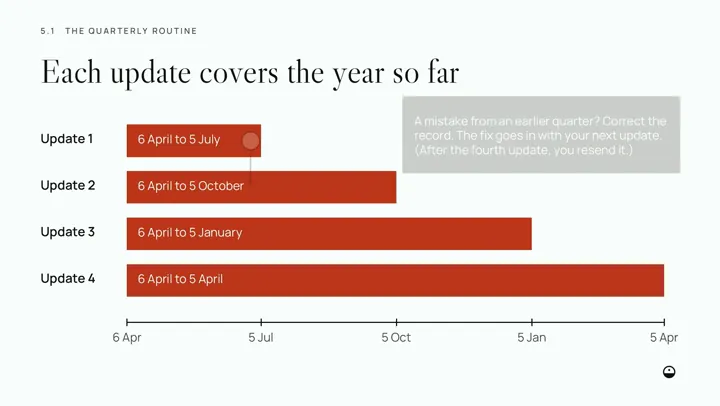
Four updates a year, on dates that never move. Starting on 6 April 2027, your first four are these.
- 7August 2027covering 6 April to 5 July
- 7November 2027covering 6 April to 5 October
- 7February 2028covering 6 April to 5 January
- 7May 2028covering 6 April to 5 April
In the Budget on 28 October 2026, the government said late updates in this first year won't get penalty points, though you still send all four before your tax return. From 2028 to 2029, each missed deadline earns a point. At four points you pay £200, and another £200 for each deadline you miss after that.
It's the same tax, kept a new way.
What stays the same
- One tax return a year, by 31 January
- Paying your tax by 31 January, and 31 July if you make payments on account
What's new
- Software that works with Making Tax Digital
- Digital records of every amount, date and category
- An update every three months: a summary of your totals, not a tax return
- Your tax return sent through that software
- Penalty points for late updates and returns
See what you're buying.
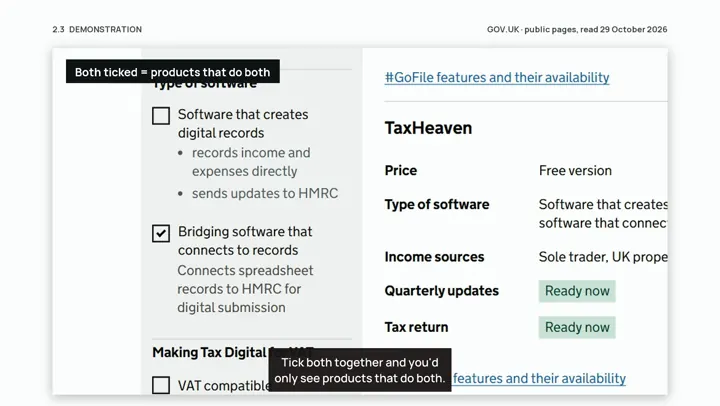
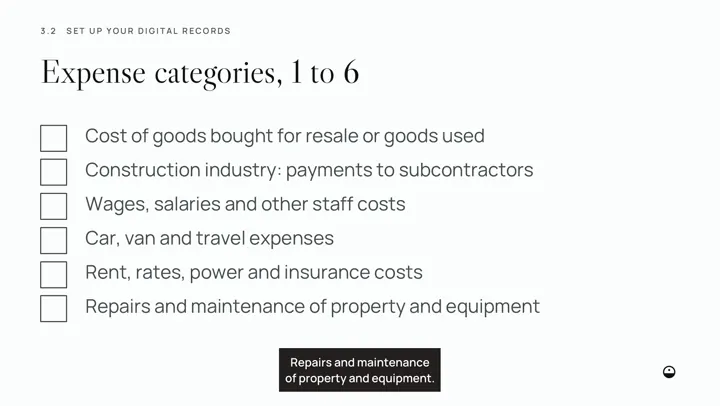
These are real frames from the lessons: short, plain and worked through on screen, using an invented decorator called Sam.
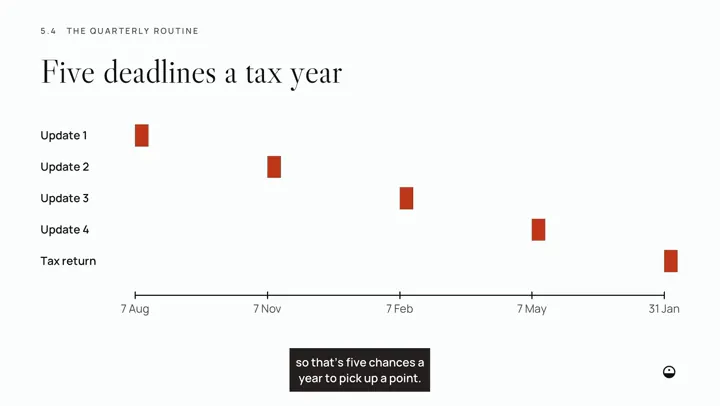
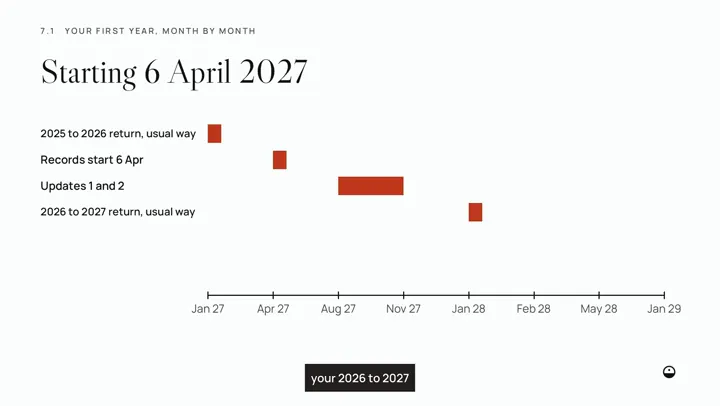
The questions you'll want answered.
"Why pay when GOV.UK is free?"
GOV.UK has the rules, and we link to it throughout. What it doesn't do is put them in order for a sole trader. Here you get one job per lesson, on your own figures, with a workbook and templates to do it in.
"Can't my accountant do this?"
They can do almost all of it, if you're paying them to. Lesson 6.2 sets out who sends what, and you get a list of questions to ask them. If your accountant has it covered, you may not need this course.
"Which software do I actually need?"
Module 2 shows you the two types, what to check on a free product, and how to use HMRC's own finder. You leave with a written shortlist and one choice.
"What do I do with my box of receipts?"
Module 3 covers what counts as a digital record, cash and card payouts, mixed bills, mileage, and how your headings map to HMRC's categories.
"What if I send the wrong thing?"
Module 5 walks through a whole practice quarter, then how to send an update and check it arrived. If you spot a mistake later, you correct the record and the fix goes in with your next update.
Free lesson, no sign-up
Find the one figure that sets your start date.
It's your turnover, not your profit. You'll find it on your 2025 to 2026 tax return, or add it up from your books if that isn't sent yet. Six minutes, using an invented decorator's figures, exactly as buyers see it.
By the end, you're set up.
Each lesson gives you a job to do on your own business, so you finish with each job done or dated in your diary, not just understood.
Get the course, £49- Your start date confirmed from your own figures, and any exemption checked
- Your software chosen from a written shortlist that fits your budget, free options included
- Your records set up from your first day, with your own headings matched to HMRC's categories
- Your sign-up done and software connected, or a dated plan in your diary to do it
- A practice quarter worked through on your own figures and checked against your bank
- Your four deadlines and your own send-by dates in the diary, with a quarterly checklist
- Your final return decided: who sends it, and by when
What's in the course
24 video lessons in 8 parts, about 2 hours 10 minutes in all, with captions. Each part ends with a short check, and a final project pulls everything into one readiness pack.
Yours to download and keep
- The course workbook
- Ready for Making Tax Digital, our 43-page guide, £24 on its own
- Readiness check and software comparison (Excel)
- Quarterly calendar, category map and mileage log (Excel)
- Questions for your accountant and software provider (Word)
Intro Getting started 11 min
- 0.1 What changes and what doesn't
- 0.2 First win: find your qualifying income on last year's return
Module 1 Do you need it, and from when? 15 min
- 1.1 Qualifying income, with three examples
- 1.2 Exemptions and digital exclusion
- 1.3 What HMRC sends you, and what if it doesn't
Module 2 Choose your software 17 min
- 2.1 Record-keeping or bridging software
- 2.2 Features that matter, and the limits of free products
- 2.3 Make your shortlist
Module 3 Set up your digital records 24 min
- 3.1 What a digital record is
- 3.2 HMRC's categories and your headings
- 3.3 Cash, card payouts and mixed bills
- 3.4 Full or simpler categories, and mileage
Module 4 Sign up and connect 16 min
- 4.1 Before you sign up
- 4.2 Signing up and authorising your software
- 4.3 Volunteering early: what you agree to
Module 5 The quarterly routine 22 min
- 5.1 Your quarterly update: what you send, and when
- 5.2 A practice quarter, start to finish
- 5.3 Sending it and checking it arrived
- 5.4 Penalty points, and staying clear of them
Module 6 The end of the year 17 min
- 6.1 Adjustments and your final return
- 6.2 You or your accountant: who sends what
- 6.3 Paying, and the new late-payment penalties
Module 7 Your first year, month by month 10 min
- 7.1 Your first-year calendar
- 7.2 When things change: new work, stopping, changing software
Is it for you?
Yes, if
- You're a sole trader doing your own books, or you'd like to
- You start on 6 April 2027 or 2028, or you started in 2026 and need to catch up (our examples use a 2027 start)
- Your records live in a notebook, a spreadsheet or a box of receipts today
- You have an accountant and want to know what's yours to do and what's theirs
No, if
- You're a limited company or a partnership
- Your only income is from property
- You need help with VAT returns
- You want advice on what to claim or how much tax you owe
£49, once.
Nothing monthly for the course. That covers all 24 lessons, the workbook, the templates and our guide, which is £24 on its own. Any software you choose is separate, and some is free.
Get the course, £49Secure card payment through Stripe. You can start as soon as you've paid.
- How long you keep it
- For as long as we offer the course, and at least two years from the day you buy.
- If something doesn't work
- If a lesson won't play or a file won't open, we'll fix it or refund you.
- Changing your mind
- You can cancel until you start a lesson or a download. After that you can't cancel for a change of mind. Refunds and cancellations
- Who you're buying from
- Digital Beacon is a small UK publisher of practical guides and courses. We aren't accountants, and we aren't connected with HMRC: every rule in the lessons comes from GOV.UK, and the examples use invented people and figures. Our business information
- Questions first?
- Email hello@thedigitalbeacon.net. We aim to reply within one working day.
Questions
Do I have to buy software?
You need software that works with Making Tax Digital. HMRC says free products exist for simple tax affairs, though they can have limits. Module 2 shows you what to check. We don't recommend one product.
I'm not good with computers. Will I cope?
The lessons are short, with captions, and you can pause and rewind. Being unfamiliar with software doesn't get you an exemption, but age, health or disability might, if they make using software unreasonable for you. Lesson 1.2 covers this.
Is it tax advice?
No. It's general information based on HMRC's published guidance, and we don't look at your figures. Where your own situation decides the answer, the lesson says so and points you to HMRC or an accountant.
What if I start in 2028?
The steps are the same, a year later. If your 2025 to 2026 turnover wasn't over £30,000, your 2026 to 2027 figure is tested against £20,000. The free checker shows which applies.
How do I watch it?
Online, in your account on this site, on a phone, tablet or computer. The videos need an internet connection and can't be downloaded. The workbook and templates are downloads.
General information, not tax advice. Not connected with HMRC. Rules checked on GOV.UK on 1 November 2026. HMRC's own checker. Already bought it? Go to your course.